Troubleshoot snapshots
When a snapshot fails, KOTS automatically collects and stores a support bundle. This bundle contains all logs and system state at the time of the failure. It is a good place to view the logs.
Replicated KOTS is available only for existing customers. For supporting installations into customer managed clusters, we recommend Helm. For more information, see About Helm Installations with Replicated.
KOTS is a Generally Available (GA) product for existing customers. For more information about the Replicated product lifecycle phases, see Support Lifecycle Policy.
Velero is crashing
If Velero is crashing and not starting, some common causes are:
Invalid cloud credentials
Symptom
You see the following error message from Velero when trying to configure a snapshot.
time="2020-04-10T14:22:24Z" level=info msg="Checking existence of namespace" logSource="pkg/cmd/server/server.go:337" namespace=velero
time="2020-04-10T14:22:24Z" level=info msg="Namespace exists" logSource="pkg/cmd/server/server.go:343" namespace=velero
time="2020-04-10T14:22:27Z" level=info msg="Checking existence of Velero custom resource definitions" logSource="pkg/cmd/server/server.go:372"
time="2020-04-10T14:22:31Z" level=info msg="All Velero custom resource definitions exist" logSource="pkg/cmd/server/server.go:406"
time="2020-04-10T14:22:31Z" level=info msg="Checking that all backup storage locations are valid" logSource="pkg/cmd/server/server.go:413"
An error occurred: some backup storage locations are invalid: backup store for location "default" is invalid: rpc error: code = Unknown desc = NoSuchBucket: The specified bucket does not exist
        status code: 404, request id: BEFAE2B9B05A2DCF, host id: YdlejsorQrn667ziO6Xr6gzwKJJ3jpZzZBMwwMIMpWj18Phfii6Za+dQ4AgfzRcxavQXYcgxRJI=
Cause
If the cloud access credentials are invalid or do not have access to the location in the configuration, Velero will crashloop. The support bundle includes the Velero logs, and the message looks like this.
Solution
Replicated recommends that you validate the access key / secret or service account json.
Invalid top-level directories
Symptom
You see the following error message when Velero is starting:
time="2020-04-10T14:12:42Z" level=info msg="Checking existence of namespace" logSource="pkg/cmd/server/server.go:337" namespace=velero
time="2020-04-10T14:12:42Z" level=info msg="Namespace exists" logSource="pkg/cmd/server/server.go:343" namespace=velero
time="2020-04-10T14:12:44Z" level=info msg="Checking existence of Velero custom resource definitions" logSource="pkg/cmd/server/server.go:372"
time="2020-04-10T14:12:44Z" level=info msg="All Velero custom resource definitions exist" logSource="pkg/cmd/server/server.go:406"
time="2020-04-10T14:12:44Z" level=info msg="Checking that all backup storage locations are valid" logSource="pkg/cmd/server/server.go:413"
An error occurred: some backup storage locations are invalid: backup store for location "default" is invalid: Backup store contains invalid top-level directories: [other-directory]
Cause
Velero displays this error message when it attempts to start and uses a reconfigured or re-used bucket.
When configuring Velero to use a bucket, the bucket cannot contain other data, or Velero will crash.
Solution
Configure Velero to use a bucket that does not contain other data.
Node agent is crashing
If the node-agent Pod is crashing and not starting, some common causes are:
Metrics server is failing to start
Symptom
You see the following error in the node-agent logs.
time="2023-11-16T21:29:44Z" level=info msg="Starting metric server for node agent at address []" logSource="pkg/cmd/cli/nodeagent/server.go:229"
time="2023-11-16T21:29:44Z" level=fatal msg="Failed to start metric server for node agent at []: listen tcp :80: bind: permission denied" logSource="pkg/cmd/cli/nodeagent/server.go:236"
Cause
This issue occurs in Velero 1.12.0 and 1.12.1. Velero does not set the port correctly when starting the metrics server. The metrics server fails to start with a permission denied error. The error occurs in environments that do not run MinIO and have Host Path, Network File System (NFS), or internal storage destinations configured. When the metrics server fails to start, the node-agent Pod crashes. For more information about this issue, see the GitHub issue details.
Solution
Replicated recommends that you either upgrade to Velero 1.12.2 or later, or downgrade to a version earlier than 1.12.0.
Snapshot creation is failing
Timeout error when creating a snapshot
Symptom
You see a backup error that includes a timeout message when attempting to create a snapshot. For example:
Error backing up item
timed out after 12h0m0s
Cause
This error message appears when the node-agent Pod operation reaches the timeout limit. The default timeout is 240 minutes.
For Velero 1.16 and earlier, Velero integrates with Restic to provide a solution for backing up and restoring Kubernetes volumes. For more information, see File System Backup in the Velero documentation.
For Velero 1.17 and later, Velero uses Kopia for file-system backups by default.
Solution
Use the kubectl Kubernetes command-line tool to patch the Velero deployment to increase the timeout:
Velero 1.17 and later:
kubectl patch deployment velero -n velero --type json -p '[{"op":"add","path":"/spec/template/spec/containers/0/args/-","value":"--fs-backup-timeout=TIMEOUT_LIMIT"}]'
Velero 1.16 and earlier:
kubectl patch deployment velero -n velero --type json -p '[{"op":"add","path":"/spec/template/spec/containers/0/args/-","value":"--restic-timeout=TIMEOUT_LIMIT"}]'
Replace TIMEOUT_LIMIT with a length of time for the node-agent Pod operation timeout in hours, minutes, and seconds. Use the format 0h0m0s. For example, 48h30m0s.
The timeout value reverts back to the default value if you rerun the velero install command.
Memory limit reached on the node-agent pod
Symptom
The Linux kernel Out Of Memory (OOM) killer kills the node-agent Pod, or snapshots fail with errors similar to:
pod volume backup failed: ... signal: killed
Cause
Velero sets default limits for the velero Pod and the node-agent Pod during installation. For Velero 1.16 and earlier, a known Restic issue causes high memory usage. This high memory usage can cause failures during snapshot creation when the Pod reaches the memory limit. For Velero 1.17 and later, Velero uses Kopia for file-system backups by default. Large volumes with Kopia can also require a higher memory limit.
For more information about the Restic issue, see the Restic backup — OOM-killed on raspberry pi after backing up another computer to same repo issue in the Restic GitHub repository.
Solution
Increase the default memory limit for the node-agent Pod if your application is particularly large. For more information about configuring Velero resource requests and limits, see Customize resource requests and limits in the Velero documentation.
For example, the following kubectl command increases the memory limit for the node-agent DaemonSet from the default of 1Gi to 2Gi:
kubectl -n velero patch daemonset node-agent -p '{"spec":{"template":{"spec":{"containers":[{"name":"node-agent","resources":{"limits":{"memory":"2Gi"}}}]}}}}'
Alternatively, you can lower the memory garbage collection target percentage on the node-agent DaemonSet. This can help the node-agent Pod avoid reaching the memory limit during snapshot creation. Run the following kubectl command:
kubectl -n velero set env daemonset/node-agent GOGC=1
Velero cannot read at least one source file
Symptom
You see the following error in Velero logs:
Error backing up item...Warning: at least one source file could not be read
Cause
For Velero 1.16 and earlier, there are file changes between Restic's initial scan of the volume and during the backup to the Restic store.
Solution
To resolve this issue, do one of the following:
- Use hooks to export data to an EmptyDir volume and include that in the backup instead of the primary PVC volume. See Configure Backup and Restore Hooks for Snapshots.
- Freeze the file system to ensure all pending disk I/O operations have completed prior to taking a snapshot. For more information, see Hook Example with fsfreeze in the Velero documentation.
Kopia file-system backup issues (Velero 1.17 and later)
Data mover pods do not start or complete
Cause
For Velero 1.17 and later, Kopia spawns data mover pods from the node-agent. If a backup or restore stays in progress, the data mover pods might not start or complete.
Solution
Check the node-agent logs for errors that prevent data mover pods from starting. Verify that the cluster can pull the data mover pod image and that any pod security policies or security context constraints allow the pod to start.
BackupRepository is not available
Cause
For Velero 1.17 and later, Kopia uses BackupRepository custom resources (CRs) to manage repositories. A backup or restore can fail if the BackupRepository CR is not available or is in a failed state.
Solution
Check the status of the BackupRepository CRs:
kubectl get backuprepositories -n velero
Describe any CR that is not in a Ready state to view the error:
kubectl describe backuprepository BACKUP_REPOSITORY_NAME -n velero
Common errors include invalid credentials, network connectivity issues, or problems with the underlying storage. After you resolve the issue, Velero retries the backup repository operations.
Read-only root filesystem errors
Cause
For Velero 1.17 and later, Kopia needs writable directories for cache and configuration. The default paths are /home/cnb/udmrepo and /home/cnb/.cache. If ReadOnlyRootFilesystem applies to the Velero or node-agent pods, Kopia cannot write to these directories and the backup or restore fails.
Solution
Add emptyDir volumes for /home/cnb/udmrepo and /home/cnb/.cache to the Velero deployment and the node-agent daemon set. Mount the volumes at the required paths so Kopia can write cache and configuration data.
LVP storage location is unavailable after upgrade
Cause
The Local Volume Provider (LVP) is not compatible with Kopia. If you upgrade to Velero 1.17 or later and the existing storage location uses LVP, snapshots fail because Kopia cannot write to LVP storage.
LVP backups created on Velero 1.16 and earlier are not restorable on Velero 1.17 and later. Before you upgrade, migrate to a Kopia-compatible storage destination. For more information, see Upgrade Velero for snapshots.
Solution
Before you upgrade to Velero 1.17 or later, migrate from LVP to a Kopia-compatible destination. Replicated recommends one of the following options:
- Reinstall KOTS with
--with-minio=true. - Reconfigure the storage location to use an external S3-compatible object store, such as Amazon S3, Google Cloud Storage, Azure Blob Storage, or another S3-compatible provider. Install the target Velero plugin before you reconfigure the storage location.
For more information, see Upgrade Velero for snapshots.
Snapshot restore is failing
Service NodePort is already allocated
Symptom
In the Replicated KOTS Admin Console, you see an Application failed to restore error. The error indicates that the port number for a static NodePort is already in use. For example:
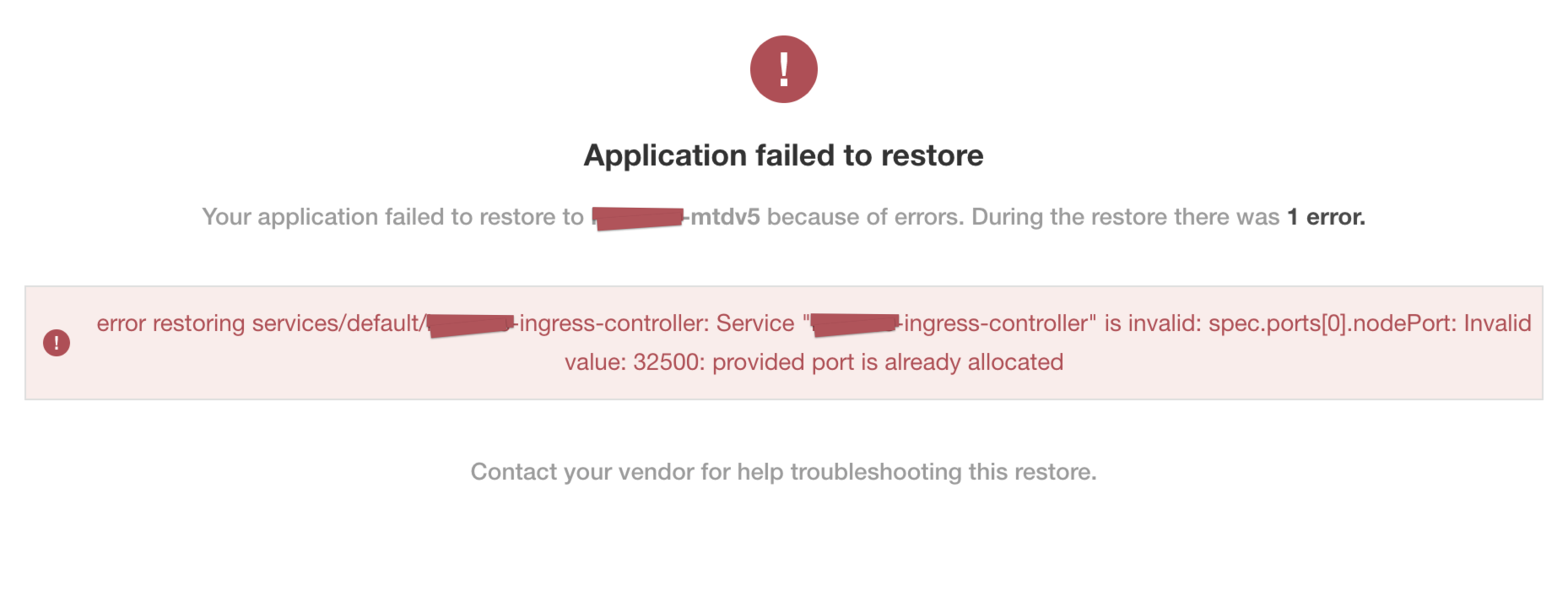
View a larger version of this image
Cause
A known issue in Kubernetes versions earlier than version 1.19 can cause static NodePort services to collide in multi-primary high availability setups. This collision occurs when recreating the services. For more information about this known issue, see https://github.com/kubernetes/kubernetes/issues/85894.
Solution
Kubernetes version 1.19 fixes this issue. To resolve this issue, upgrade to Kubernetes version 1.19 or later.
For more information about the fix, see https://github.com/kubernetes/kubernetes/pull/89937.
Partial snapshot restore finishes with warnings
Symptom
In the Admin Console, when the partial snapshot restore completes, you see warnings indicating that Velero did not restore Endpoint resources:
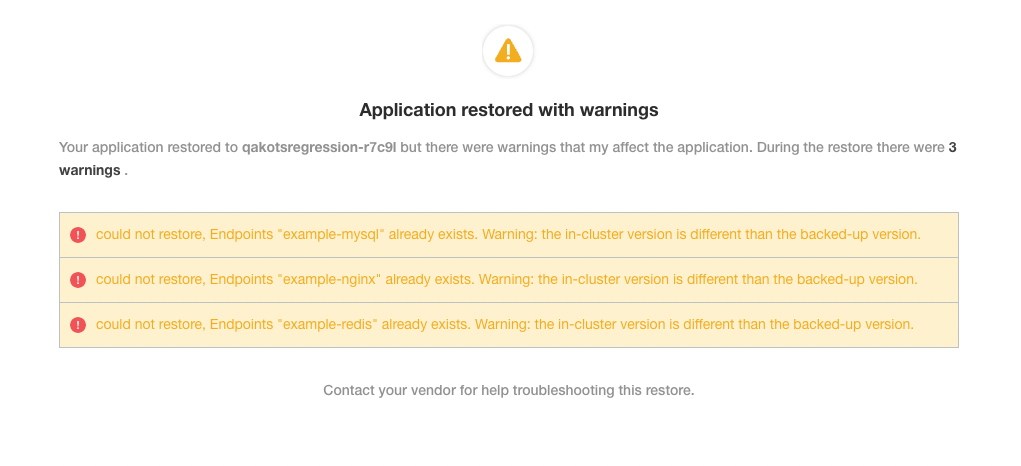
Cause
Velero changed the resource restore priority in 1.10.3 and 1.11.0, which leads to this warning when restoring Endpoint resources. For more information about this issue, see the issue details in GitHub.
Solution
These warnings do not necessarily mean that the restore itself failed. The endpoints likely exist because Kubernetes creates them when the restore process restores the related Service resources. However, to prevent encountering these warnings, use Velero version 1.11.1 or later.